

Build a simple but complete Todo CRUD application using Laravel as a JSON API and Vue 3 (Vite) as the frontend SPA — using modern Vue features (<script setup>), Pinia for state, and Axios for API calls. This tutorial is aimed at developers who want a practical, production-ready starter.
Prerequisites
- Node.js 16+ (Node 18+ recommended)
- npm or pnpm or yarn (we’ll use npm in commands)
- PHP 8.1+
- Composer
- MySQL (or other DB) and basic knowledge of creating databases
- Optional: XAMPP / Valet / Docker — any local PHP environment that can run Laravel.
1: Project layout & approach
We’ll create two projects in sibling folders:
workspace/

├─ todo-api/ # Laravel backend (API)

└─ todo-vue/ # Vue 3 frontend (Vite)
2: Create Laravel API (todo-api)
2.1 Create project
composer create-project laravel/laravel todo-api

cd todo-api

php artisan key:generate
2.2 Configure database
Open .env and set DB credentials:
DB_CONNECTION=mysql

DB_HOST=127.0.0.1

DB_PORT=3306

DB_DATABASE=todo_api

DB_USERNAME=root

DB_PASSWORD=your_password
Create the todo_api database in MySQL
2.3 Create model & migration
php artisan make:model Task -mEdit the generated migration (database/migrations/xxxx_xx_xx_create_tasks_table.php):
Schema::create('tasks', function (Blueprint $table) {

$table->id();

$table->string('title');

$table->text('description')->nullable();

$table->boolean('completed')->default(false);

$table->timestamps();

});

php artisan migrate
2.4 Add fillable to model
app/Models/Task.php:
<?php

namespace App\Models;

use Illuminate\Database\Eloquent\Model;

class Task extends Model

{

protected $fillable = ['title', 'description', 'completed'];

}
2.5 Create API controller
php artisan make:controller Api/TaskController --apiReplace app/Http/Controllers/Api/TaskController.php with:
<?php

namespace App\Http\Controllers\Api;

use App\Http\Controllers\Controller;

use App\Models\Task;

use Illuminate\Http\Request;

class TaskController extends Controller

{

public function index()

{

return Task::latest()->get();

}

public function store(Request $request)

{

$data = $request->validate([

'title' => 'required|string|max:255',

'description' => 'nullable|string'

]);

$task = Task::create($data);

return response()->json($task, 201);

}

public function show(Task $task)

{

return $task;

}

public function update(Request $request, Task $task)

{

$data = $request->validate([

'title' => 'required|string|max:255',

'description' => 'nullable|string',

'completed' => 'boolean'

]);

$task->update($data);

return $task;

}

public function destroy(Task $task)

{

$task->delete();

return response()->noContent();

}

}
2.6 API routes
In routes/api.php:
use App\Http\Controllers\Api\TaskController;

Route::apiResource('tasks', TaskController::class);
2.7 Allow cross-origin requests (CORS) for local dev
Laravel includes CORS config in config/cors.php. For simple local dev, set:
'paths' => ['api/*'],

'allowed_origins' => ['http://localhost:5173'], // Vue dev server

'allowed_methods' => ['*'],

'allowed_headers' => ['*'],
2.8 Run Laravel server
php artisan serve --port=8000API base URL: http://<host>:<port>/api/tasks
3: Create Vue 3 SPA with Vite (todo-vue)
3.1 Create project
From same parent folder:
npm create vite@latest todo-vue -- --template vue

cd todo-vue

npm install
3.2 Install dependencies
npm install axios pinia3.3 Project structure (essential files)
todo-vue/
├─ index.html
├─ package.json
└─ src/
   ├─ main.js
   ├─ App.vue
   ├─ stores/
   │  └─ useTasks.js
   └─ components/
      ├─ TaskForm.vue
      └─ TaskList.vue
3.4 src/main.js
import { createApp } from 'vue'

import { createPinia } from 'pinia'

import App from './App.vue'

import './style.css' // optional

const app = createApp(App)

app.use(createPinia())

app.mount('#app')
3.5 src/stores/useTasks.js (Pinia store)
import { defineStore } from 'pinia'

import axios from 'axios'

const api = axios.create({

baseURL: 'http://127.0.0.1:8000/api',

// timeout: 5000

})

export const useTasks = defineStore('tasks', {

state: () => ({

list: [],

loading: false

}),

actions: {

async fetch() {

this.loading = true

try {

const res = await api.get('/tasks')

this.list = res.data

} finally {

this.loading = false

}

},

async add(payload) {

const res = await api.post('/tasks', payload)

this.list.unshift(res.data)

},

async updateTask(task) {

const res = await api.put(`/tasks/${task.id}`, task)

const idx = this.list.findIndex(t => t.id === task.id)

if (idx !== -1) this.list[idx] = res.data

},

async remove(id) {

await api.delete(`/tasks/${id}`)

this.list = this.list.filter(t => t.id !== id)

}

}

})
3.6 src/components/TaskForm.vue
<template>

<form @submit.prevent="handleSubmit" class="task-form">

<input

v-model="title"

type="text"

placeholder="Enter task title"

required

class="input"

/>

<textarea

v-model="description"

placeholder="Enter description"

class="textarea"

></textarea>

<button type="submit" class="btn">Add Task</button>

</form>

</template>

<script setup>

import { ref } from 'vue'

import { useTasks } from '../stores/useTasks'

const store = useTasks()

const title = ref('')

const description = ref('')

const handleSubmit = async () => {

if (!title.value) return

await store.add({ title: title.value, description: description.value })

title.value = ''

description.value = ''

}

</script>

<style scoped>

.task-form {

display: flex;

flex-direction: column;

gap: 8px;

margin-bottom: 1rem;

}

.input, .textarea {

padding: 8px;

border-radius: 5px;

border: 1px solid #ccc;

}

.btn {

padding: 8px 12px;

border: none;

border-radius: 5px;

background: #42b883;

color: white;

cursor: pointer;

}

.btn:hover {

background: #2c8a66;

}

</style>
3.7 src/components/TaskList.vue
<template>

<ul>

<li v-for="task in store.list" :key="task.id">

<label>

<input type="checkbox" v-model="task.completed" @change="toggle(task)" />

<span :class="{ done: task.completed }">{{ task.title }}</span>

</label>

<button @click="remove(task.id)">❌</button>

</li>

</ul>

</template>

<script setup>

import { useTasks } from '../stores/useTasks'

const store = useTasks()

const toggle = async (task) => {

await store.updateTask(task)

}

const remove = async (id) => {

await store.remove(id)

}

</script>

<style scoped>

ul {

list-style: none;

padding: 0;

}

li {

display: flex;

justify-content: space-between;

padding: 6px;

border-bottom: 1px solid #eee;

}

.done {

text-decoration: line-through;

color: #888;

}

</style>
3.8 src/App.vue
<template>

<div class="container">

<h1>Todo App</h1>

<task-form @created="fetch" />

<task-list />

</div>

</template>

<script setup>

import { onMounted } from 'vue'

import { useTasks } from './stores/useTasks'

import TaskForm from './components/TaskForm.vue'

import TaskList from './components/TaskList.vue'

const store = useTasks()

const fetch = () => store.fetch()

onMounted(fetch)

</script>

<style>

/* minimal styles or use Tailwind/Vuetify etc. */

</style>
3.9 Run frontend
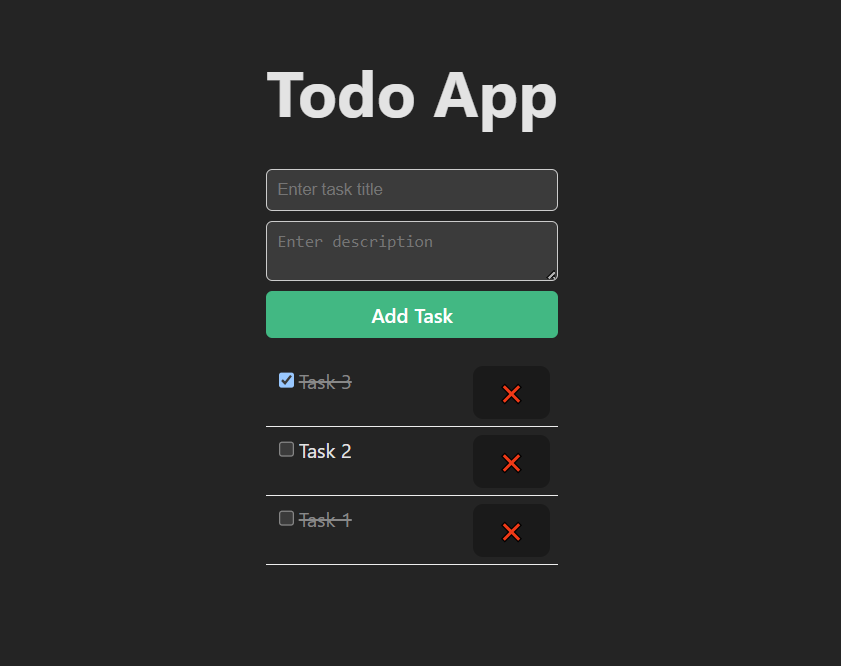
npm run devBelow is the screenshot of the final output:
Building a Todo App using Laravel API and Vue 3 (Vite) offers developers a clear understanding of full-stack integration, from backend API development to modern frontend implementation. This approach not only enhances productivity but also ensures scalability, clean architecture, and maintainable code. Such projects serve as a strong foundation for building real-world web applications with robust frameworks.

